 DASAPT
 Xinren Chen
Index a detector hit map by laying a crystal over the poles.
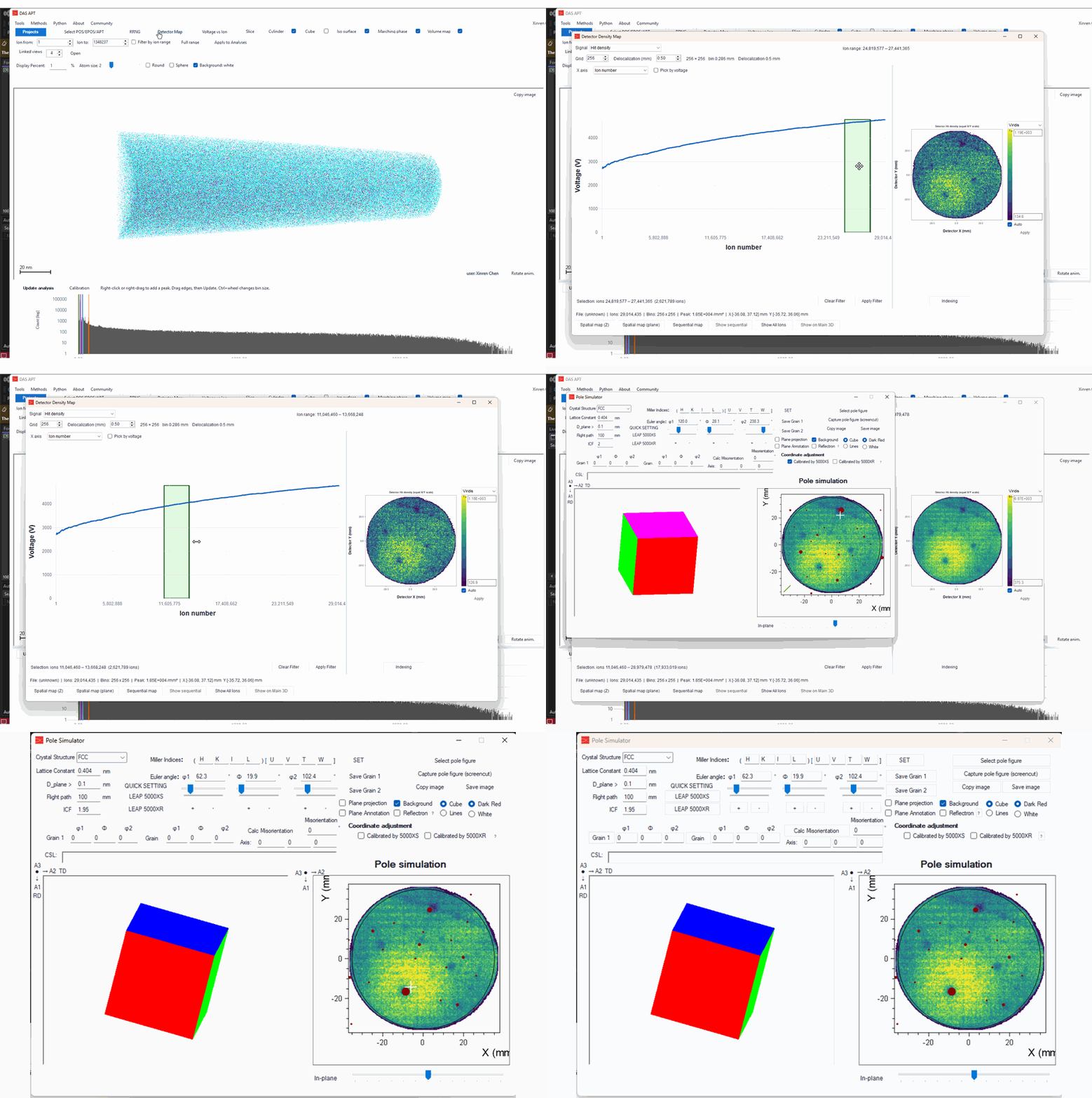
- Open a reconstruction that contains detector hits, then click Detector Map.
- The map uses Hit density. Grid is 256 and delocalization is 0.50 mm.
- Drag the green band on the voltage curve to choose an ion range. The round map on the right updates. The dark spots are the poles.
- Click Indexing and choose the detector. This example is LEAP 5000 XS.
- The Pole Simulator opens with that map behind the calculated poles. The crystal is FCC with a lattice constant of 0.404 nm.
- Drag on the pole figure to tilt the crystal. The cube on the left follows. Move it until the red spots sit on the dark poles. In this example the Euler angles end near φ1 62.3°, Φ 19.9°, φ2 102.4°.
- The In-plane slider rotates the crystal in the detector plane.
- Check Plane projection to draw the plane traces on the map. Uncheck it to leave the poles alone.
Save Grain 1 keeps that orientation.
0 comments
Sign in to comment.