 DASAPT
 Xinren Chen
Open a reconstructed APT file in DASAPT, keep it with the project, and show the ions with a range file.
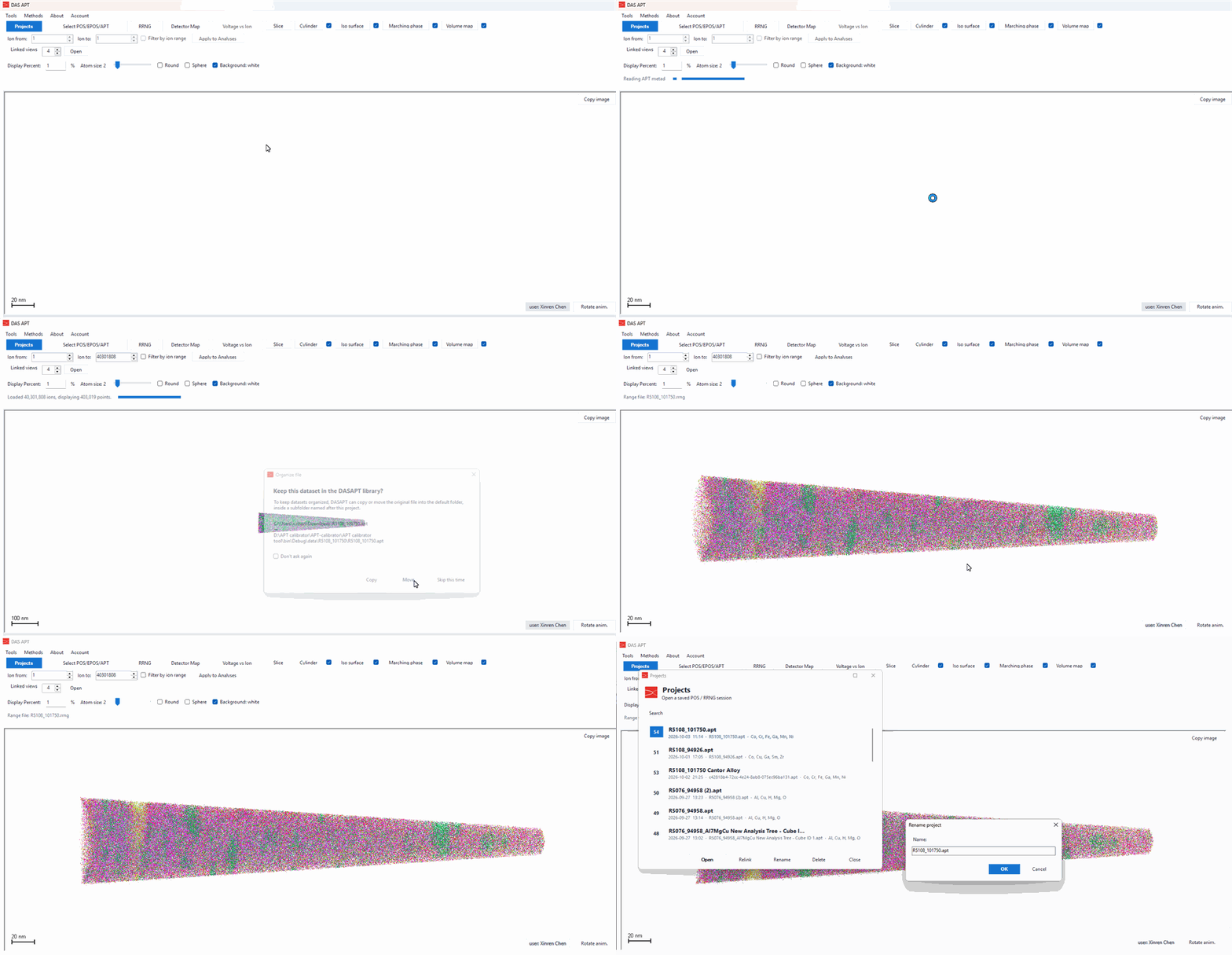
- Click Select POS/EPOS/APT.
- Choose the
.aptfile and click Open. The same button also opens.posand.eposfiles. - DASAPT shows APT structure: the ion count, and whether the file contains reconstruction coordinates, mass-to-charge, voltage, detector hits, multiplicity, time of flight, and pulse. If reconstruction coordinates are present, they are drawn directly. Click Load.
- Wait while the file is read. A large dataset is drawn as a sampled point cloud. The status line reports how many ions were loaded and how many points are on screen. Display Percent and Atom size change that sampling afterwards.
- If DASAPT asks Keep this dataset in the DASAPT library?, choose Copy to leave the original file where it is, Move to place it in the project folder, or Skip this time.
- A
.rrngfile with the same name, sitting next to the APT, is loaded automatically and the ions are colored. The status line then shows the range file name. If there is no range file beside it, click RRNG and choose one. - Drag in the view to rotate the reconstruction, or click Rotate anim. to spin it.
- Click Projects to open this dataset again. From that list you can Open, Relink, Rename, or Delete a project.
0 comments
Sign in to comment.